
Home-cooked plates, scanned.
Roast dinner. Spag bol. Tomato pasta with the bits you added on top. Snap, edit, save.
No barcode on a restaurant plate or a home-cooked dinner? Photograph it. Our AI picks out the food, estimates the portions and works out the calories, macros and ingredients, then drops the lot into your diary. Quicker than typing it in, closer than guessing.
Pro feature £3.99/month or £34.99/year on iOS Cancel any time
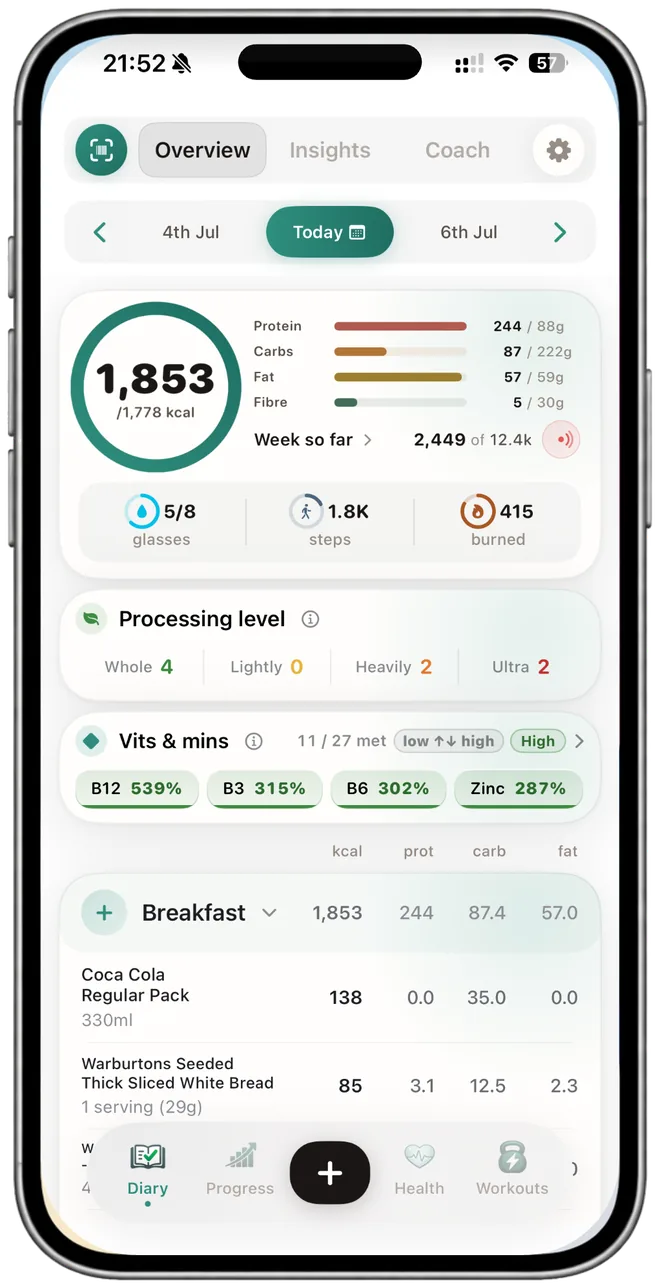
No weighing scales, no typing. We're looking at the picture and you're confirming what we got right.
Point the camera at the plate and the AI meal scanner names each component, sausages, mash, peas, estimates the portion from the picture, and pulls the calories and macros from UK food composition data. You see every item before anything saves, so you can swap a component, nudge a portion, or drop something it misread.
Tap save and the meal lands in your diary, with your daily totals updating against your calorie goal, your macros and your reference values. No scales, and no typing homemade lasagne into a search box. It is the quickest way to log the food that never came with a barcode. (Pro.)
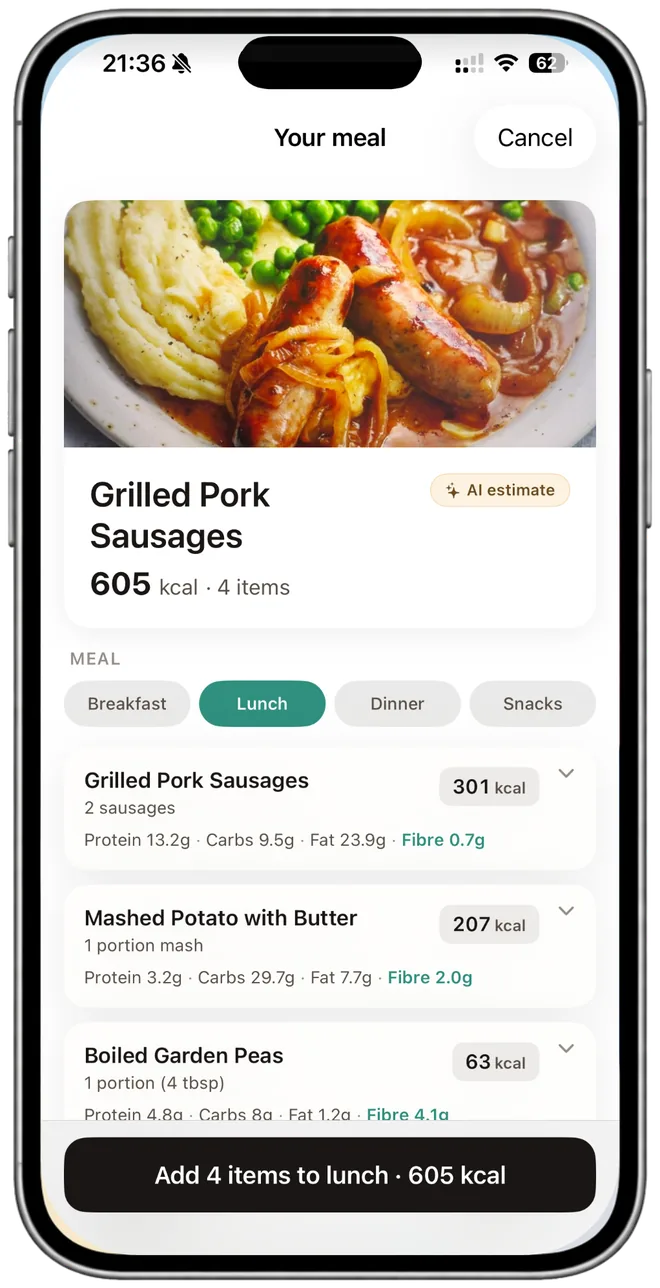
The photo path is for everything the barcode can't read. Home cooking. Restaurant plates. Sunday roast. The Pret salad pot you can't remember the name of.
Roast dinner. Spag bol. Tomato pasta with the bits you added on top. Snap, edit, save.
Photograph the plate before you tuck in. The scan estimates calories and macros for things you'll never get a barcode for.
Calories, macros, vitamins, minerals. As soon as you save the scan, the diary updates and the bars move.
We get it wrong sometimes: similar-looking foods, oblique angles. Swap the wrong one, nudge the portion, save the right meal.
The whole point. Snap, glance, save. Beats hunting "homemade lasagne" in a food database.
Photograph the meal, log how you felt after. Two taps each. Over a few weeks, you'll see which plates keep showing up when you feel rubbish.
Same diary. Barcode for the packet, photo for the plate. Both add to the day, both count toward your totals, both keep the additive flag on.
Six questions people send in over and over. If yours isn't here, ping us from the support page.
AI meal scanning gives a useful estimate for home-cooked plates, takeaways and meal-deal items. Accuracy is best on well-lit photos of a single plate with the food clearly visible. Mixed dishes (curries, stews, layered bakes) are harder to estimate precisely. For exact tracking, barcode scanning of packaged food is more reliable; most people use both.
A vision model has learned what common foods look like. From your photo it picks the components, estimates portion sizes from visual cues, and matches each component to a food entry to calculate calories, macros and ingredients. You can edit anything before it saves to your diary.
Barcode for packaged food (it pulls the manufacturer's data straight off the label) and photo for plates without a barcode: home cooking, restaurant meals, takeaways, deli items, fresh produce. Most people use both: barcode for the weekly shop, photo for meals.
Yes. We've tuned it on UK plates and UK supermarket items: full English, beans on toast, jacket potato, shepherd's pie, fish and chips, Tesco meal deals, Pret salad pots and the like. The calorie and macro numbers reference UK food composition data first.
Yes. Photograph your plate before eating. The scanner picks the components and estimates calories and macros. It won't match a weighed at-home log, but it's usually closer than guessing and faster than typing it all in. This is one of the most common uses.
No. AI meal scan is a NutraSafe Pro feature at £3.99 a month or £34.99 a year on iOS. The free tier covers barcode scanning, typing in foods and logging up to 25 items a day. Pro removes the daily cap and unlocks the AI meal scan, AI Coach, workouts, fasting and suspected triggers.
An AI meal scan is an editable estimate, not a laboratory measurement. Lighting, hidden oil, sauces and mixed dishes can change the result, so the September review keeps the page clear about where the tool is strongest: getting an unlabelled plate into the diary quickly. For packaged food, use the food barcode scanner and compare the current pack.
We also connected this page to the new manufacturer-verified product ingredient guides. Those guides show why an exact variant and verification date matter whenever a recipe, allergen or additive is involved.
Last reviewed: 17 September 2026
AI meal scan is a Pro feature at £3.99 a month or £34.99 a year. The barcode scanner and the diary are free to use. Try those first, then upgrade when you want the photo path.
iPhone · iOS 17 · Cancel any time