
The UK food label traffic light system, explained
The colour bar on the front of UK packs comes from the FSA. It's voluntary, not mandatory. Here are the four thresholds the FSA actually uses, the per-100g vs per-portion rules, and what it doesn't show.
Voluntary FSA scheme Per 100g comparison Source: FSA front-of-pack guidance
What green, amber and red mean
The FSA's front-of-pack scheme covers four nutrients: fat, saturates, sugars and salt. Green is low, amber is medium, red is high. Below are the exact thresholds the FSA publishes, in grams per 100g of food (drinks use their own slightly lower thresholds).
Green, low
"A healthier choice for that nutrient." Look for green where you can; lots of greens on a pack is a quick signal it's lighter on fat, sugar, salt or all three.
Amber, medium
"OK most of the time." Not a red flag, not a clear win. Most everyday packs land here on at least one or two nutrients.
Red, high
"Have less often, and in small amounts." A red doesn't mean don't eat it. It means it's a food to enjoy occasionally rather than daily.
The four thresholds the FSA publishes
Per 100g of food. Drinks have their own scheme (and lower thresholds). Where a portion is bigger than 100g, FSA guidance has a per-portion red threshold too, listed in the right column.
| Nutrient | Green (low) | Amber (medium) | Red (high) | Red per portion |
|---|---|---|---|---|
| Fat | 3g or under per 100g | Over 3g to 17.5g per 100g | Over 17.5g per 100g | Over 21g per portion |
| Saturates | 1.5g or under per 100g | Over 1.5g to 5g per 100g | Over 5g per 100g | Over 6g per portion |
| Sugars | 5g or under per 100g | Over 5g to 22.5g per 100g | Over 22.5g per 100g | Over 27g per portion |
| Salt | 0.3g or under per 100g | Over 0.3g to 1.5g per 100g | Over 1.5g per 100g | Over 1.8g per portion |
Source: FSA front-of-pack nutrition labelling guidance (UK technical guidance, retained post-EU). Adopted voluntarily by major UK supermarkets and manufacturers.
Compare per 100g, eat by portion
The FSA prefers per 100g for comparing two packs side by side: it's the only fair way to say "this cereal is sweeter than that cereal" without a portion-size sleight of hand. The per-portion red threshold catches foods where one serving is large enough to push a nutrient into the high range on its own.
Use per 100g to compare
- Two cereals on the shelfPer 100g shows which has more sugar gram-for-gram.
- Two ready mealsManufacturers don't always declare the same portion size.
- Pre-packed sandwich vs anotherPer 100g keeps the comparison honest.
Use per portion for "what am I eating"
- Pizza slice, ready meal, takeawayOne portion is often 300 to 500g.
- Big-portion redFSA's red-per-portion thresholds flag packs that push fat, saturates, sugar or salt high in one go.
- The "back-of-pack" panelMandatory under retained EU Reg 1169/2011. Has both columns.
What a barcode scan adds to the colour bar
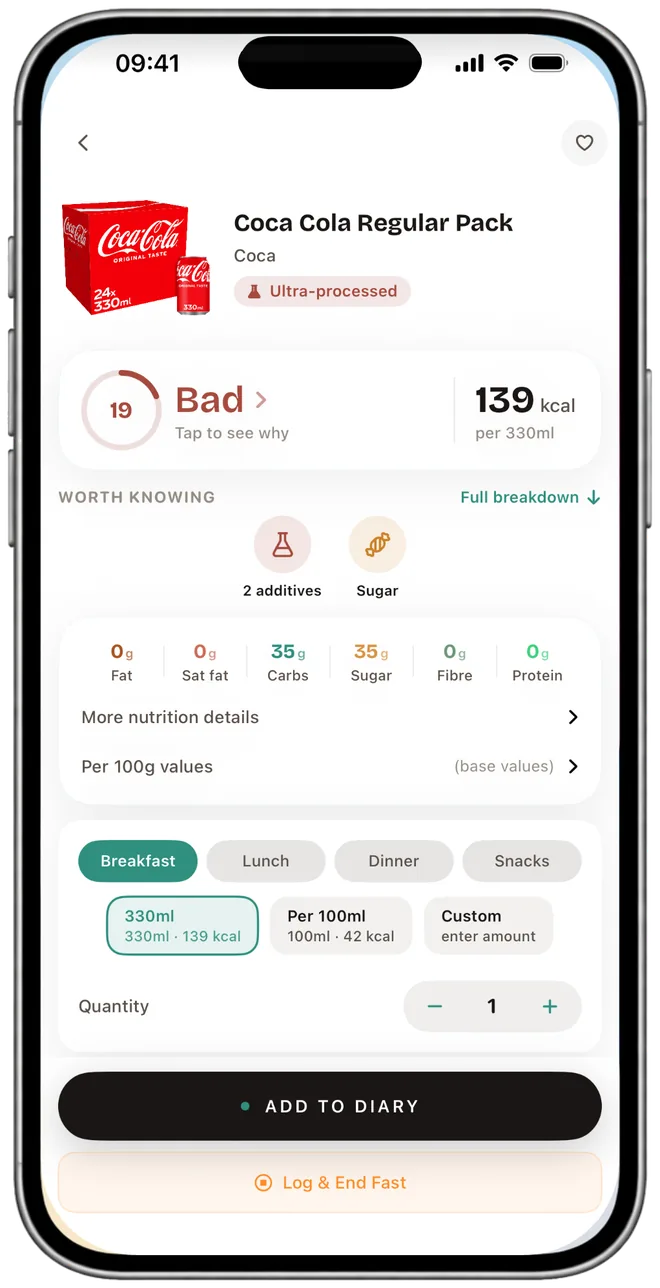
The traffic light only covers four nutrients. Scan the barcode in NutraSafe and we add the rest: every additive on the pack in plain English, the Big 14 allergens, and the calorie totals for your day. On Pro, vitamins and minerals against the UK NRV too.
What the bar doesn't show
The FSA panel is a fast read for fat, saturates, sugar and salt. It can't tell you what E471 is, whether the pack contains soya, how much vitamin C is in it, or how much salt you've eaten across the whole day.
Scan the barcode and we fill the per-100g and per-portion panel, then add the parts the colour bar leaves out: a count of the additives we recognise, the Big 14 allergens we hold in the ingredient data, and the running totals for your day. Naming each additive in plain English is on Pro. On Pro, vitamins and minerals against the UK NRV too. Flagged additives carry the source on the line, so you can check it.
Traffic light label FAQ
Sourced to FSA front-of-pack guidance, NHS Eatwell and retained EU Reg 1169/2011.
Green is low for that nutrient. Amber is medium. Red is high. The four nutrients are fat, saturates, sugars and salt. The FSA developed the scheme so a shopper can read the front of a pack in a few seconds.
No. The back-of-pack nutrition declaration is mandatory under retained EU Reg 1169/2011. The front-of-pack colour bar is voluntary, recommended by the FSA, and adopted by most major UK supermarkets and many manufacturers.
Per 100g of food: fat is green at 3g or under, amber over 3g to 17.5g, red over 17.5g. Saturates green at 1.5g or under, amber over 1.5g to 5g, red over 5g. Sugars green at 5g or under, amber over 5g to 22.5g, red over 22.5g. Salt green at 0.3g or under, amber over 0.3g to 1.5g, red over 1.5g. Per-portion red thresholds (over 21g fat, 6g saturates, 27g sugar, 1.8g salt) catch large single servings.
Not on its own. Olive oil, cheese and nuts will show red for fat because they're naturally high in fat. The colour bar is a quick guide, not a complete picture. It doesn't show fibre, additives, vitamins or minerals.
No. The bar only covers fat, saturates, sugars and salt. Additives and E-numbers live in the ingredient list further down the pack. We pull them out and explain each one in plain English.
Drinks have their own (lower) thresholds because a typical drink portion is bigger than a typical food portion (a 330ml can is larger than a 100g portion of cheese). The FSA's drinks scheme adjusts the cut-offs accordingly.
Checked against current UK guidance
The front-of-pack traffic-light scheme remains voluntary, while the nutrition declaration on the back of most prepacked food is mandatory. Green, amber and red summarise fat, saturates, sugars and salt; energy is shown separately. Compare products using the same basis—usually per 100 g—and then check the portion displayed.
Current FSA guidance continues to describe red as high, amber as medium and green as low. A colour is a comparison aid, not a complete judgement about ingredients, allergens or processing. FSA: check the label (June 2026) · UK front-of-pack technical guidance
Last reviewed: 17 September 2026
The colour bar tells you four things, the app tells you the rest
Scan a UK pack and we surface every additive on top of the FSA panel, plus the Big 14 allergens and your day's totals. Free download. Pro £3.99/month or £34.99/year for the full per-ingredient detail.
iPhone · iOS 17 · Cancel any time