Scan a UK pack, see every ingredient in seconds

Last reviewed: 7 May 2026

Point your phone at any UK barcode and we surface the full ingredients line, every additive and E-number, your saved allergens, and our per-product grade — all on one screen.

Get NutraSafe on the App Store

What we built, and why

We built our food ingredients scanner because reading the back of a UK food pack on the high street is genuinely hard. The print is small, the ingredient line is long, half the words are chemistry, and the moment you spot an additive you don't recognise — say, a four-character emulsifier or an E-number you've never heard of — you're left squinting in the aisle with a kid pulling at your sleeve. Most of us give up and put it in the trolley anyway.

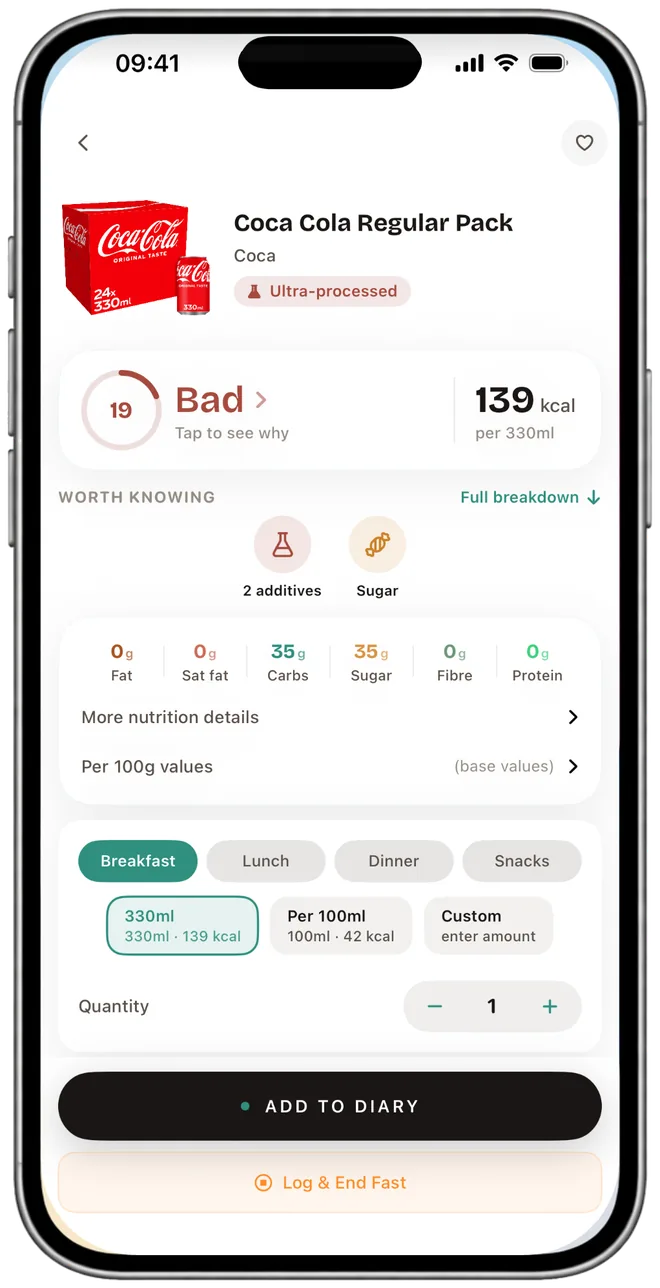
Our app is the answer to "what is actually in this?" in 2026. Scan the barcode and we show every ingredient on the pack, in order, with the additives and E-numbers picked out and explained in plain English. Allergens you've added to your profile are highlighted instantly. We also stamp a single per-product grade on the screen so you can compare two jars on the same shelf without re-reading both backs of pack. The whole interaction takes about three seconds.

What you actually see when you scan a UK barcode

Open the app, hit the scan button, point at the barcode. Here's what lands on the screen, in the order it appears:

  1. The full ingredients line. Exactly as it's printed on the pack — same order, same wording, same compound ingredients (e.g. "tomato puree (made from concentrated tomato puree, water)"). UK food law requires ingredients listed in descending order by weight, and we keep that order so you can see what dominates the recipe.
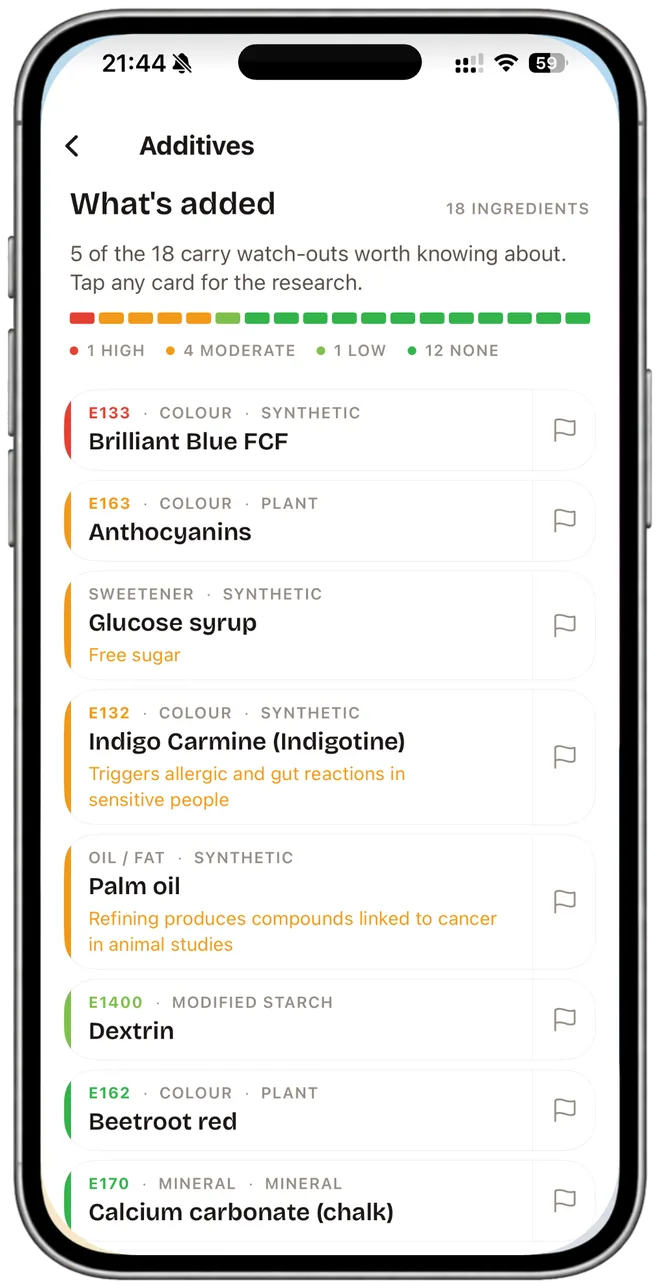
  2. Additives and E-numbers, picked out. Every additive is tagged with what it does — colouring, preservative, emulsifier, sweetener, antioxidant, thickener — and a one-line plain-English note on what's known about it. We don't reach for reassurance words. When the published science is unsettled, we say so. When something is on the FSA's watchlist or has IARC, EFSA or NHS guidance attached, we say that.
  3. Allergens highlighted against your profile. Set your allergens once in Settings (the 14 UK-recognised ones plus any free-text triggers you add). Every scan after that flags any matches in red — not as a substitute for reading the pack yourself, but as a fast first check. We're careful with the wording: when an allergen is absent from the data we have, we say "isn't in the ingredients we have", never "this product is free from X".
  4. Our per-product grade. One grade based on the recipe and the nutrition panel together. Not a single letter shouting AVOID — a grade with the reasoning behind it visible if you tap through (sugar load, saturated fat, salt, additive count, processing markers).
  5. Nutrition per 100 g and per serving. Calories, protein, carbs (including sugars), fat (including saturates), fibre, salt — pulled from the same pack you're holding.
  6. One-tap log. If you want to keep what you scanned, tap once and it's in your daily food diary at the right meal slot.

That's the whole flow on the free tier. There's no walled garden between you and the ingredients line — that part is the core of the app.

Worth knowing: reading the ingredients line tells you what's in a product, but it doesn't tell you what your diet is missing. Per the National Diet and Nutrition Survey 2019–2023 (gov.uk, June 2025), 18% of UK adults aged 19–64 had low vitamin D status, and 83% of women of childbearing age were below the folate threshold associated with neural-tube-defect risk. Scanning a single pack won't show that — it's why we added vitamin and mineral tracking against UK NRVs on Pro, so you can see week-by-week whether what you're eating is filling those gaps. The scanner stays free; the trend view is the paid layer.

What we cover, and what we don't

Our scanner reads the standard UK food barcode (GTIN/EAN) — the same format used across every UK supermarket. Products bought from Tesco, Sainsbury's, Asda, Morrisons, Aldi, Lidl, Waitrose, Co-op or M&S all look up the same way, because they all carry that one barcode standard on the back of the pack. We do not have per-retailer integrations and we don't claim to. The database is one global barcode lookup, and most of the UK packaged-grocery longtail is in there.

What you'll occasionally hit is a product where the data on the pack is richer than what's been digitised — for example a small artisan brand whose ingredients line was last submitted three years ago. When that happens we surface what we have and let you submit a correction from inside the app; a real human reviews it. We don't pretend the database is perfect, and we don't fail silently when it's thin.

What we don't do: weigh in on supermarket-only deals, claim to scan loose produce without a barcode (use a camera-based meal scan for that), or substitute for reading the back of pack when you have a serious allergy. The 14 allergens UK food law requires on packaging — celery, cereals containing gluten, crustaceans, eggs, fish, lupin, milk, molluscs, mustard, peanuts, sesame, soybeans, sulphur dioxide and tree nuts — are exactly what we match against, but on rare unindexed packs the safest move is still to read the label yourself.

Why ingredient transparency, not just calories

If you've used MyFitnessPal, Lose It or any of the older calorie trackers, you'll have noticed the ingredients line is usually missing. That's not a mistake on their part — those apps were designed around energy and macros, and their crowd-sourced databases collect what users typed in. Most users typed in calories. The ingredients field stayed empty.

Our take is that you can perfectly hit your calorie target for the day and still have eaten a dozen emulsifiers, three preservatives and two artificial colourings without realising. That's not a calorie problem; that's an ingredients-visibility problem. So we built the scanner around the ingredients line first and the macros second. If you're choosing between scanner apps, our comparison of the best apps to scan food ingredients UK 2026 walks through the differences in what each one actually shows you on screen.

What you see when you scan NutraSafe Typical calorie app
Calories & macros
Full ingredients line, in pack order
Additives picked out, plain-English notes
E-number lookup linked from each scan free
Allergen flags against your saved profile
Per-product grade, with reasoning visible
Vitamin & mineral tracking against UK NRVs Pro Limited or paywalled
Free tier 25 logs/day, no ads Varies, often ad-supported
Paid tier £3.99/month (iOS) £10–£16/month typical

Free vs Pro — what unlocks at £3.99/month

The scanner itself is free. We don't paywall the thing the page is named after, and we don't gate the ingredients line, the additive notes, the per-product grade, or the public E-number database at /e-numbers/. Free users can log up to 25 foods a day and 5 reaction entries.

NutraSafe Pro is £3.99 a month, monthly only (no annual tier), iOS only. Here's what it adds on top:

What we don't write on additives

We don't reach for reassurance words on additive notes. Two reasons. First, regulatory approval is a regulatory status, not a biological verdict — sucralose is approved and there is published work suggesting it may worsen insulin response in some people. Second, the science evolves; what reads benign today is sometimes flagged tomorrow, and we don't carry water for manufacturers. So our additive copy describes what published science actually says — "linked to", "may disrupt", "raises", "regularly eating this is associated with" — and falls silent when the evidence is unsettled.

That includes the harder cases. Processed meat is IARC Group 1 — the World Health Organization classifies regular consumption as causing bowel cancer in humans, and the NHS caps processed meat at 70 g a day. We say that, plainly. We're not here to teach chemistry or to scare you off the bacon sandwich; we're here to make the trade-off visible at the moment you scan.

Who this is for

How accurate is this, really

We won't pretend perfection. The barcode database is large but not exhaustive. Manufacturers reformulate without re-issuing the barcode, so there's always some lag between the pack you're holding and the data we hold. We display the date the entry was last verified inside the app, and you can submit a correction in two taps if a recipe has moved on. A human in our team reviews submissions — the whole loop is part of how we keep the database honest. If you're acting on something life-critical (a serious allergy, a medical diet), the back of pack is still the source of truth and we'd never tell you otherwise.

Frequently asked questions

Is there an app that shows food ingredients?

Yes. We built our scanner to show the full ingredients list for every product you scan — every ingredient, every additive, every E-number, and any of the 14 UK-recognised allergens, in the order they appear on the pack. Scan any UK barcode to see exactly what's on the label.

Why doesn't my calorie app show ingredients?

Most calorie apps are built around energy and macros — calories, protein, carbs, fat. Their databases are crowd-sourced and most users only enter calorie data, so the ingredients field stays empty. If you want to see what's actually inside a product, you need an app that indexes the ingredients line itself, not just the nutrition panel.

Can I scan a barcode to see ingredients?

Yes. Open our app, point your phone at a UK barcode, and you see the full ingredients list, additives flagged with what each one does, our per-product grade, and any of your saved allergens highlighted on the pack. We read the standard UK food barcode (GTIN/EAN) — the same format used across every UK supermarket. We don't have per-retailer integrations; the database is one global barcode lookup.

Is the food ingredients scanner free?

Our app is free to download. The free tier includes barcode scanning, the full ingredients list, our per-product grade, the public E-number lookup at /e-numbers/, and up to 25 food log entries a day. NutraSafe Pro (£3.99 a month, iOS) unlocks vitamin and mineral tracking against UK NRVs, allergen warning detail, AI Coach, AI meal scan and full reaction-pattern analysis. We don't claim the app itself is free — the download is free, the Pro tier is paid.

Will the scanner tell me a food is "safe"?

No. We don't use reassurance language on additive copy — regulatory approval is a regulatory category, not a biological verdict, and the science evolves. Our notes describe what published research actually says ("linked to", "may disrupt", "raises") and fall silent when the evidence is unsettled. We're a tracking and transparency tool, not a regulator and not your doctor.

Related Reading

Food Scanner UK The full overview of what scanning a UK barcode shows. Barcode Food Scanner App UK The best barcode scanners for checking UK food products. Scan Food Labels for Allergens How barcode scanning helps you avoid allergens. Scan Ingredients for Additives Use your phone to decode ingredient lists instantly. AI Meal Scanner App Scan meals with AI to estimate calories and nutrients. E-Numbers Database Look up any E-number — what it is and what the published science says.

Scan your first UK barcode in 60 seconds

Scan your first UK barcode in 60 seconds — see ingredients, additives, E-numbers and our per-product grade.

Free to log up to 25 foods/day. NutraSafe Pro (£3.99/month, iOS) unlocks vitamin and mineral tracking against UK NRVs, AI Coach, allergen warning detail, AI meal scan and full reaction-pattern analysis.

Get NutraSafe on the App Store

NutraSafe Pro · £3.99/month · iOS

Sources