A UK workout tracker for iPhone, iPad and Android
The UK workout tracker that lives in your food app
Log sets, reps and weight in a couple of taps, with personal bests that update themselves and Apple Watch syncing both ways. The difference: your training sits in the same diary as your food, so you track the gym and the kitchen in one app instead of paying for two. One log for workouts, calories, protein and recovery.
4.5 out of 5 from 41 App Store ratings · NutraSafe Pro · £6.99/month or £40.99/year · iPhone & Apple Watch
A neat way to track your training, in the same app as your food
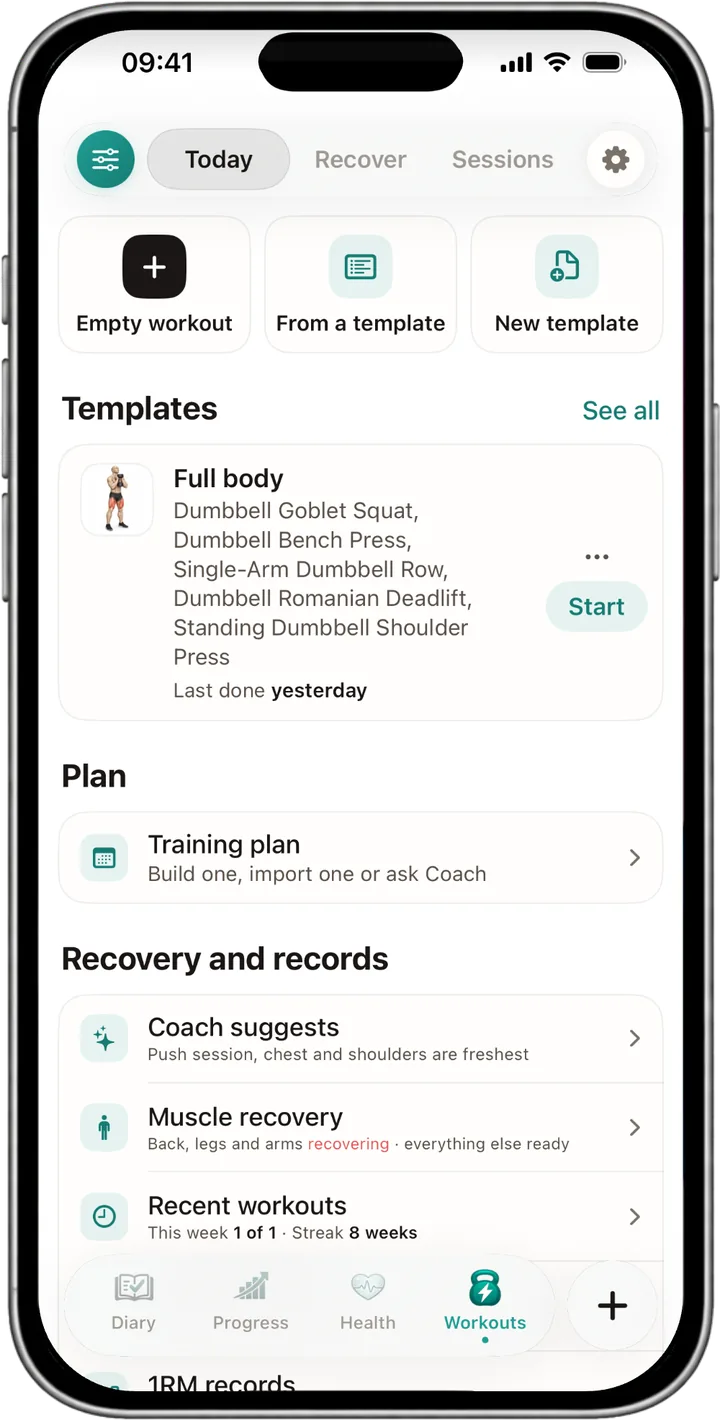
Sets, reps, weight, Apple Watch and a recovery map, all logged in the same diary as your meals. One app for the gym and the kitchen, not two subscriptions.
Log sets, reps and weight in a couple of taps
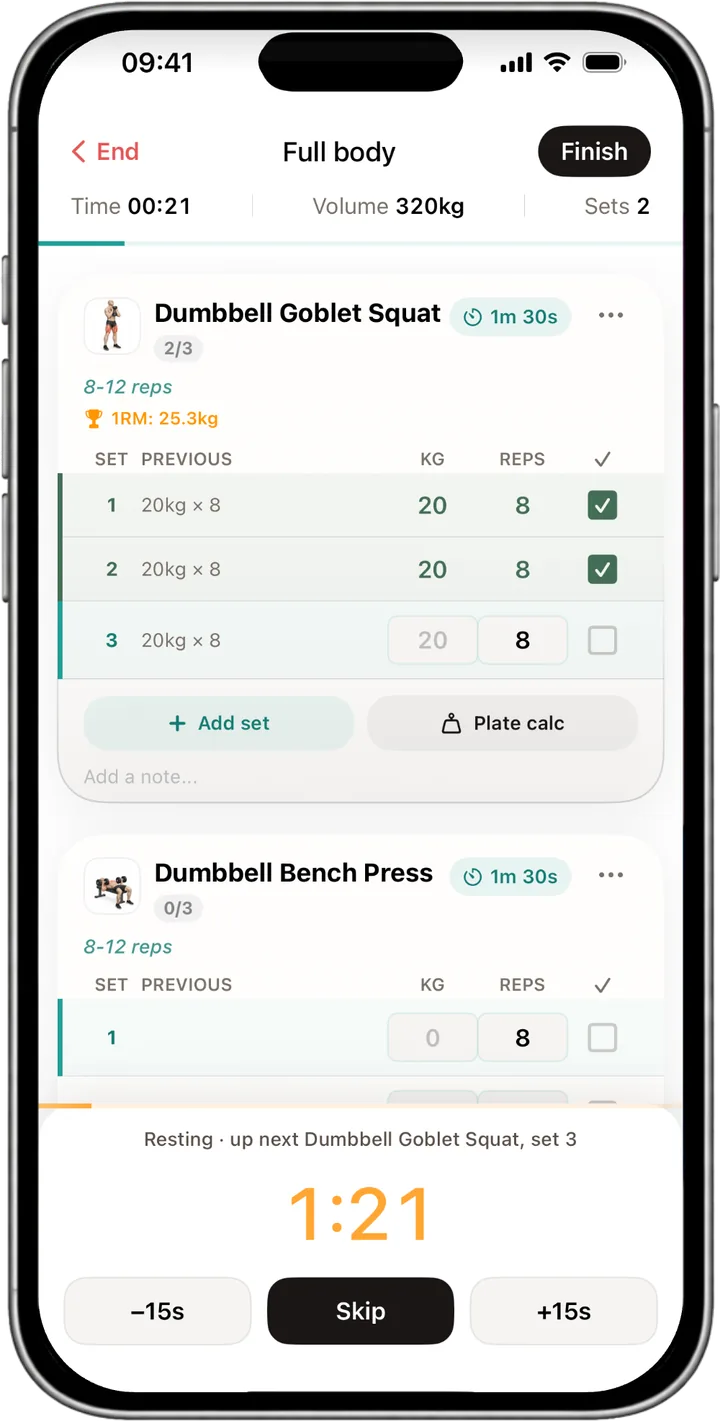
Tap in the weight, tap in the reps, tap to close the set. The same flow covers squats, bench, deadlifts, dumbbell work and anything else you train, and last week's numbers sit next to the empty boxes so you always know what to beat. Add RPE if you track it, or leave it off if you don't. It is a workout log built to keep up with, not a spreadsheet you have to babysit between sets.
A rest timer starts on its own when you finish a set, so you are not thumbing at the clock app between working sets, and it buzzes when it is time to lift again. Every set you log is kept, so the full history is there whenever you want to look back at how a lift has moved over the weeks. Sessions save to the phone first, so a weak signal in the squat rack never costs you a workout.
One app for your training and your food
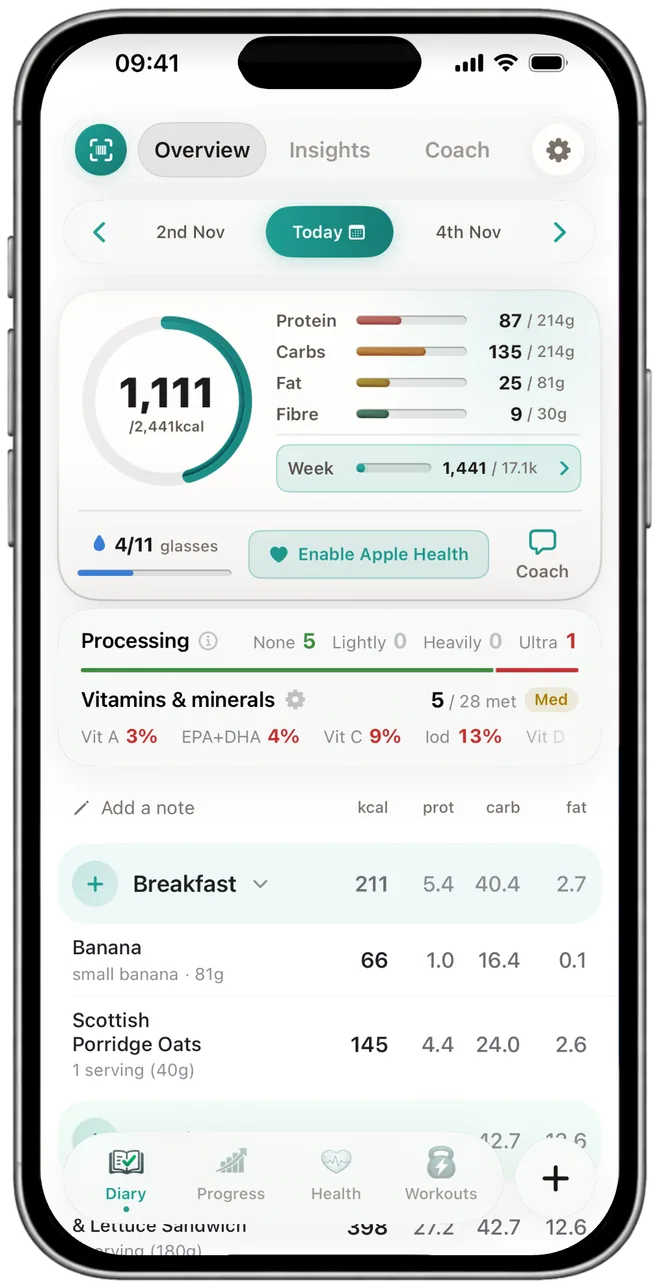
Most people end up paying for two apps: a workout tracker for the gym and a food tracker for the kitchen. NutraSafe puts both in the same diary. Your lifts land on the same day as your meals, so you are not flicking between two screens, copying numbers across, or paying two subscriptions to see one picture of your week. Standalone workout apps do the training side well, but they stop at the gym door; the food you ate to fuel the session lives somewhere else.
Because the training and the food sit together, the AI Coach can read the whole diary at once. Ask it how your week looked and it has the sessions you did and the meals you logged in front of it, rather than half the story. Ask it for a programme and it builds one from your goals, equipment and days a week, as a plan you tap to save, and it can talk through what your own log is showing about your training and your eating side by side. (Pro.)
A muscle recovery map in the same diary
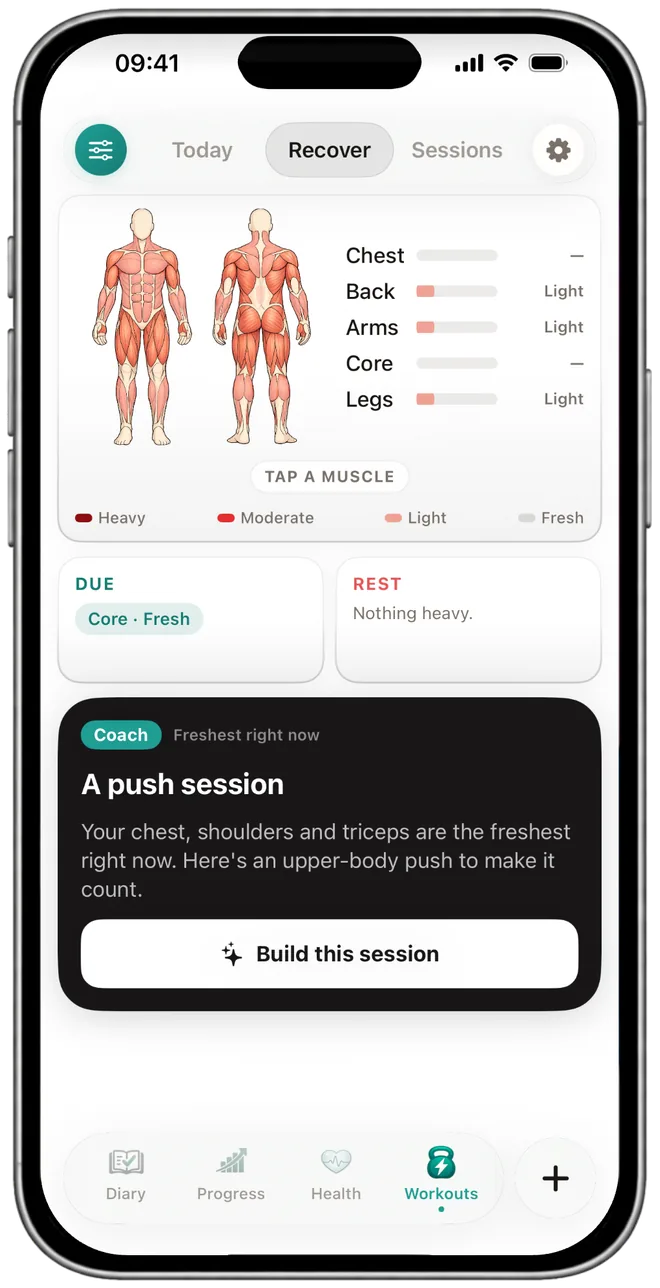
The Workouts tab shades the muscle groups you have hit hard over the last few days, so before you train you can see what is still recovering. Hammer your legs on Monday and the map tells you on Wednesday whether to push them again or give them another day. It is a quick read on your training load rather than a coaching instruction, and the choice stays yours.
The map reads from the sessions you have actually logged, not a generic template, so the picture is built from your training and no one else's. Your recent sessions list underneath, so the last thing you did and what is still sore sit on one screen. Few standalone workout apps put that next to the calories and protein you ate that week, which is the whole point of keeping them in one diary.
See your training progress over the weeks
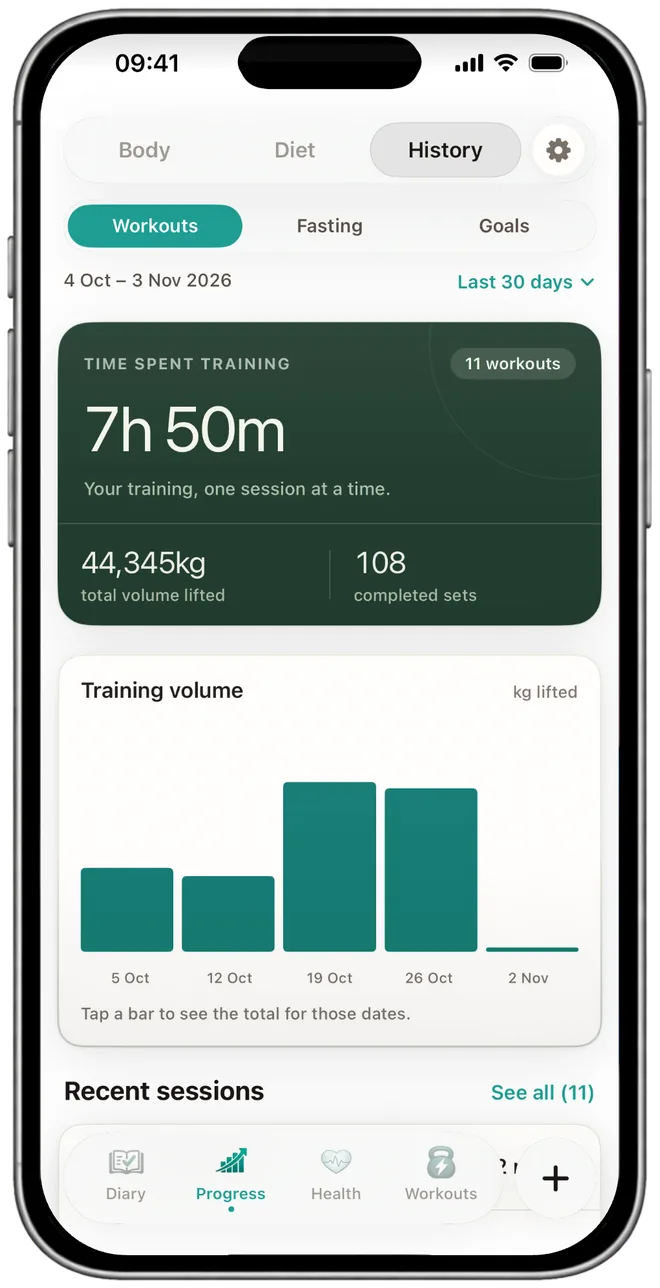
Personal bests update themselves. Hit a heavier set, or the same weight for more reps, and the best for that lift moves on its own, with no spreadsheet and no admin. The history holds every previous best, so you can watch the line move rather than guess whether you are getting stronger. The progress view puts your training next to your weight and your food trends, so the effort and the result sit on the same page.
The Progress screen shows the weight you lifted each week, the time you spent training and how many workouts you did. On the Workouts tab, This week counts every session against a weekly target you set yourself. The NHS suggests muscle-strengthening activity on at least two days a week. Miss a week and the chart shows the gap, the streak starts again, and the log carries on from your next session.
Protein and calories next to the work you did
A workout writes the calories you burned to Apple Health. The food you log writes the calories you ate. Both land in the same daily summary, so the calories in against the calories out sit in plain view instead of buried in a second app. That is the question most people open two apps to answer, and here it is one screen: did I eat enough for the work I did today?
On a heavy training day, the protein bar against your target is right there on the same page, so you can decide whether dinner needs another portion. Match a protein target to your training load, keep an eye on calories in versus calories out, and you are doing it in one diary rather than reconciling a workout tracker and a food tracker by hand. Apple Watch feeds the training side, so a run in Apple Fitness or a class in Strava lands on the same day as the lift you did at lunch.
What a session looks like, start to finish
Take a lower-body day. You open the routine and the sets and reps pre-fill from last week, so you already know what to chase. The rest timer starts after each set, heart rate streams in from the Apple Watch, and when the session closes the calories burned are written back to Apple Health and any new personal best is saved to your history. You can start it on the wrist and finish it on the phone without losing a set.
It all lands on the same diary page as your food, so you can glance at the day and see the training you did next to the protein and calories you ate to fuel it. Nothing to copy between apps, nothing to reconcile at the end of the week, and one weekly view that counts the sessions towards your strength target. That is the neat, single-app record the two-app setup never quite gives you.
The gym and the kitchen are one question, not two apps
Track your lifts in one app and your food in another and you are flicking between screens to answer a single question: did I eat enough for the work I did?
NHS guidance: strengthening activity on two days a week
The NHS physical activity guidelines for adults recommend muscle-strengthening activities on at least two days a week, on top of your weekly cardio. Most people have no simple way to see whether they actually hit that, because the training lives in one app and everything else lives somewhere else.
Log your training in NutraSafe and the Workouts tab counts your sessions each week against a target you set, in the same app as the food you ate that week. That is your own record, in one place, that you can take to a coach or a physio. If you want a programme, the AI Coach on Pro can build one from your goals, equipment and days a week, and you can change it or leave it.
We log what you did and show you the pattern. What you do with it is your call.
One subscription covers food and training
The workout tracker sits inside NutraSafe Pro, alongside the food tracker, vitamins, fasting and the AI features. One price, not two apps to pay for.
- Up to 25 food logs a dayType, search, or barcode.
- Barcode scanner with the additive countThe number of additives on the pack. Pro tells you what each one does.
- Daily calorie & macro totalsProtein, carbs, fat, fibre, salt.
- Reaction log while you build a baselineBloating, energy, mood, gut, skin.
- Workout trackerSets, reps, weight, RPE and personal bests.
- Apple Watch, both waysLog from the wrist; HealthKit syncs to the phone.
- Recovery map & weekly strength countSee what's sore and how many sessions you got in.
- Vitamins, AI Coach & AI meal scanVitamins and minerals as you log; the coach reads your diary.
- Fasting, suspected triggers, lifted caps16:8, 5:2, custom. No 25/day food cap.
Workout tracker FAQ
The questions we see from lifters, runners, home-gym folk and the people who just want a log they can actually keep up with.
A workout tracker logs exercises, sets, reps and weight as you train. It holds the history so you can see what you did last week, tracks personal bests, and keeps the sessions consistent. Ours also includes a rest timer between sets, an Apple Watch companion, and HealthKit so external workouts (Apple Fitness, Strava, third-party apps) show up alongside your lifts.
Yes. Start the session on the Watch, log sets from your wrist, see the rest timer count down, see live heart rate. Watch and iPhone sync both ways through HealthKit so finishing a set on either device updates the other.
Yes. Sessions log to the device first. When you reconnect, the data syncs up. Mobile signal in the squat rack isn't a prerequisite for keeping a record.
The download is free. The workout tracker itself sits inside NutraSafe Pro at £6.99 a month or £40.99 a year on iOS. The free tier covers food logging (up to 25 entries a day) and barcode scanning. Workouts, AI Coach, fasting and the suspected-triggers analysis are part of Pro.
Not on its own. The tracker logs what you did: sets, reps, weight, RPE and rest, and charts it over time. On Pro, the AI Coach builds a programme if you ask, from your goals, equipment and days a week, and nothing is saved until you tap the plan. If you would rather follow a coach or a programme like the NHS Strength and Flex plan, you log it the same way.
The lifting log is ours. The running log lives where you record the run (Apple Fitness, Strava, Nike Run Club). Anything that writes to HealthKit lands on the same diary day, so a Tuesday run and a Wednesday lift sit on the same week without you doing the joining.
Nothing breaks. The tracker doesn't streak-shame. The chart has a gap; you carry on next session. If you're working to the NHS two-strength-sessions-a-week target, the weekly view shows you where the gap was so you can plan around it.
Read
next.
More on this, sourced the same way.
Log every set, and your food and training sit in one diary
Sets, reps, weight, rest timer, personal bests, Apple Watch both ways. NutraSafe Pro £6.99 a month or £40.99 a year on iOS. Cancel any time inside your Apple subscriptions.
iPhone and iPad · iOS 17 · Apple Watch optional